How to Create AI Voice for YouTube Videos (Step-by-Step Guide 2026)
If you’ve spent any time on YouTube recently, you’ve probably noticed a growing trend of videos without a human voice, yet still engaging, clear, and professional.
Welcome to the world of AI voice for YouTube videos.
From faceless YouTube channels to automated content creators, AI voice technology has made it possible for anyone to start a YouTube channel without recording their own voice. Whether you’re shy, don’t have a good microphone, or simply want to scale content faster, AI voice generators are changing the game.
But here’s the important part:
Not all AI voice content performs well, and not all of it gets monetized.
In this guide, you’ll learn:
- How to create realistic AI voiceovers step-by-step
- The best tools (free and paid)
- How to make your AI voice sound human
- And how to monetize your videos safely
Let’s start from the basics.
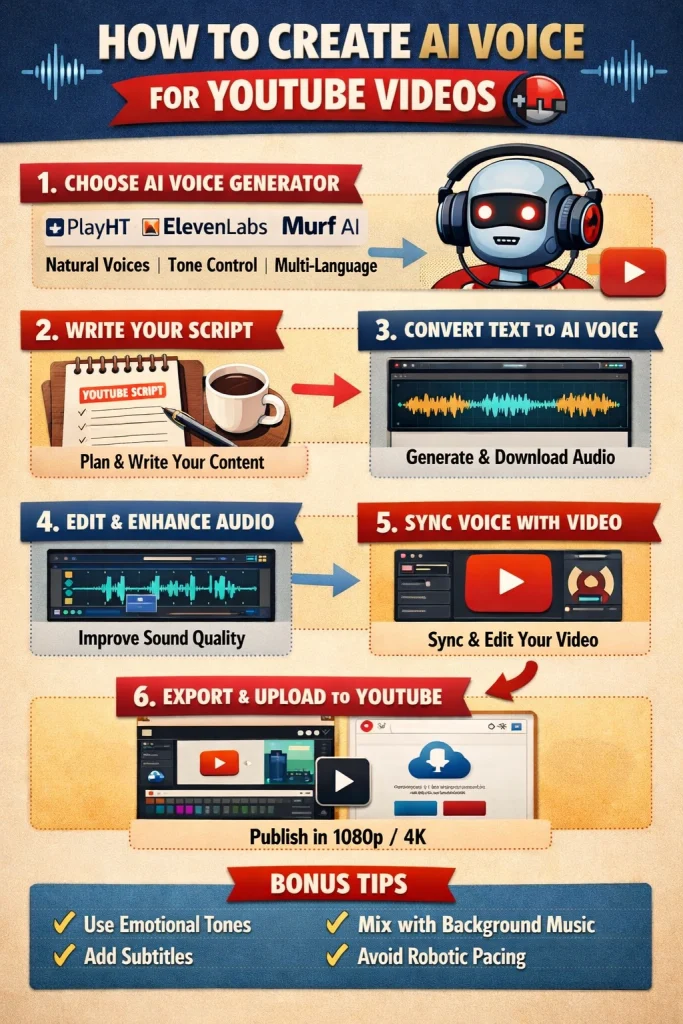
What is AI Voice for YouTube?
AI voice is a technology that converts written text into spoken audio using advanced algorithms. This is commonly known as text-to-speech (TTS).
Modern AI voices are powered by neural voice synthesis, which means they can sound almost identical to real human speech, including tone, emotion, and natural pauses.
Instead of recording your voice manually, you simply:
- Write a script
- Paste it into an AI voice generator
- Download the audio
That’s it.
Why AI Voice is Popular for YouTube
There are several reasons why creators are switching to AI voice:
- No need for a microphone
- Saves time and effort
- Perfect for faceless channels
- Easy to scale content production
- Multiple accents and languages available
This makes AI voice ideal for niches like:
- Educational videos
- Tech reviews
- Storytelling
- Finance and motivation
- YouTube Shorts
Is AI Voice Allowed on YouTube?
This is one of the most important questions, especially if your goal is monetization.
The short answer: YES, AI voice is allowed.
But there are conditions.
YouTube does NOT ban AI voice changer content. However, your videos must:
- Provide original value
- Avoid repetitive or spam content
- Not to be auto-generated without editing
What YouTube DOESN’T Allow
- Reused content (copy-paste videos)
- Low-effort automation
- Robotic, low-quality narration
- No meaningful human input
What YouTube DOES Allow
- High-quality AI voiceovers
- Edited, engaging videos
- Unique scripts and storytelling
- Educational or informative content
👉 Important:
If your AI voice sounds natural and your content is valuable, you can absolutely get monetized.
Best AI Voice Generators for YouTube
Choosing the right tool is critical. The quality of your voiceover will directly affect:
- Watch time
- Engagement
- Monetization approval
These are great for beginners:
- Basic text-to-speech tools
- Limited voice options
- Sometimes robotic
Good for testing, but not ideal for long-term growth.
Paid AI Voice Tools (Recommended)
If you’re serious about YouTube, investing in a good AI voice tool is worth it.
Benefits:
- Realistic human-like voices
- Multiple accents and emotions
- Better clarity and engagement
Look for features like:
- Neural voices
- Voice cloning
- Speed and pitch control
- Commercial usage rights
It includes PlayHT AI, alternatives, and natural keyword integration (like PlayHT AI review, best alternatives, etc.) 👇
Best AI Voice Generators for YouTube (Free & Paid)
Choosing the right AI voice generator can make or break your YouTube videos. A realistic, human-like voice keeps viewers engaged, improves watch time, and increases your chances of monetization.
Below are some of the best AI voice generators for YouTube videos, including both free and premium options.
PlayHT AI (Best for Realistic Voices & YouTube Creators)
PlayHT AI is one of the most popular tools for creating high-quality AI voiceovers for YouTube. It offers ultra-realistic voices powered by advanced neural speech technology.
🔑 Key Features:
- 800+ realistic AI voices
- Multiple languages and accents
- Voice cloning capability
- Commercial usage rights
- Download in high-quality audio formats
👍 Pros:
- Very natural, human-like voices
- Great for faceless YouTube channels
- Easy to use for beginners
👎 Cons:
- Limited features in free plan
👉 If you’re planning to build a serious YouTube channel, this is one of the best AI voice generators available right now.
💡 You can also check a detailed PlayHT AI review on our site to explore pricing, features, and real use cases.
ElevenLabs (Best for Ultra-Realistic Voice Quality)
ElevenLabs is widely known for producing some of the most realistic AI voices in the industry.
🔑 Features:
- Advanced voice cloning
- Emotional and expressive voices
- High-quality narration output
Best for:
- Storytelling channels
- Documentary-style videos
- Professional voiceovers
Murf AI (Best for Business & Professional Use)
Murf AI is another powerful tool designed for creators who want studio-quality voiceovers.
🔑 Features:
- Voice customization
- Built-in audio editor
- Team collaboration tools
Best for:
- Educational content
- Corporate-style YouTube videos
Lovo AI (Best for Beginners)
Lovo AI is beginner-friendly and offers a good balance between quality and ease of use.
🔑 Features:
- Simple interface
- Decent voice quality
- Affordable pricing
Best for:
- New YouTubers
- Quick voice generation
Speechelo (Budget-Friendly Option)
Speechelo is a budget-friendly AI voice tool often used by beginners.
🔑 Features:
- One-time payment option
- Simple text-to-speech
- Basic voice customization
Limitation:
- Less realistic compared to advanced tools
PlayHT AI vs Other AI Voice Generators
When comparing tools, here’s a simple breakdown:
- PlayHT AI → Best balance of quality + usability
- ElevenLabs → Most realistic voice output
- Murf AI → Best for professional/business content
- Lovo AI → Best for beginners
- Speechelo → Budget option
👉 If you’re looking for PlayHT alternatives, tools like ElevenLabs and Murf AI are strong competitors depending on your needs.
Which AI Voice Generator Should You Choose?
- 👉 Beginner → Lovo AI
- 👉 Budget → Speechelo
- 👉 Best overall → PlayHT AI
- 👉 Ultra realism → ElevenLabs
Step-by-Step Guide: How to Create an AI Voice for YouTube Videos
Now let’s go through the exact process.
Step 1: Write a High-Quality Script
Everything starts with your script.
Even the best AI voice won’t save a boring script.
Tips for Writing a Good Script:
- Use simple, conversational language
- Write like you speak
- Keep sentences short
- Add storytelling elements
- Hook the viewer in the first 5 seconds
👉 Example Hook:
“Did you know you can start a YouTube channel without ever using your voice?”
That’s how you grab attention.
Step 2: Convert Text to AI Voice
Now it’s time to turn your script into audio.
What to do:
- Paste your script into the AI tool
- Choose a voice (male/female, accent, tone)
- Adjust speed and pitch
- Generate audio
Pro Tip:
Always test multiple voices before choosing one.
Some voices sound better depending on your niche.
Step 3: Edit and Enhance the Audio
Raw AI voice isn’t always perfect.
You need to refine it.
What to improve:
- Remove unnatural pauses
- Adjust pacing
- Fix pronunciation issues
- Add slight pauses for realism
Tools you can use:
- Basic audio editors
- Video editing software
This step makes a huge difference.
Step 4: Add Voice to Your Video
Now combine your voiceover with visuals.
Popular video tools:
- CapCut
- Premiere Pro
- DaVinci Resolve
What to include:
- Stock footage
- Images
- Text animations
- Background music
Make sure everything syncs with your voice.
Tips to Make an AI Voice Sound Human
This is where most people fail and where you can stand out.
1. Use Punctuation Properly
AI reads exactly what you write.
Use:
- Commas (,)
- Periods (.)
- Ellipses (…)
These create natural pauses.
2. Choose the Right Voice
Not all AI voices are equal.
Pick one that:
- Matches your niche
- Sounds natural
- Has an emotional tone
3. Adjust Speed and Tone
Too fast = unnatural
Too slow = boring
Find a balanced pace.
4. Add Emotion Through Text
Example:
Instead of:
“This is a great tool.”
Write:
“This is an incredibly powerful tool… and here’s why.”
5. Avoid Long Robotic Sentences
Break them into smaller parts.
This improves:
- Clarity
- Engagement
- Natural flow
How to Monetize AI Voice YouTube Videos
Yes, you can make money with AI voice videos.
Here’s how:
1. YouTube AdSense
Once you meet:
- 1,000 subscribers
- 4,000 watch hours
You can apply for monetization.
👉 Key tip:
Focus on quality, not quantity.
2. Affiliate Marketing
Promote:
- AI tools
- Software
- Online services
Add links in your description.
3. Faceless YouTube Channels
AI voice is perfect for:
- Automation channels
- Content scaling
- Passive income
Popular niches:
- Finance
- Motivation
- Tech
- Facts videos
4. Selling Digital Products
Once you grow:
- Sell courses
- Ebooks
- Templates
Common Mistakes to Avoid
Avoid these if you want to succeed:
❌ Using Low-Quality Voices
Makes viewers leave instantly.
❌ Copying Content
YouTube will not monetize you.
❌ No Editing
Raw AI voice sounds robotic.
❌ Over-Automation
You still need human creativity.
❌ Ignoring Script Quality
Your script is EVERYTHING.
Frequently Asked Questions (FAQs)
Is AI voice free?
Some tools offer free plans, but high-quality voices usually require payment.
Which AI voice is the most realistic?
Premium tools with neural voices offer the best quality.
Can AI voice videos get monetized?
Yes, if they provide value and are not spammy.
Is AI voice copyright-free?
Most tools offer commercial licenses, but always check the terms.
How long should my videos be?
8–12 minutes is ideal for monetization.
Final Thoughts
Creating an AI voice for YouTube videos is no longer complicated. With the right approach, you can build a professional channel without ever recording your voice.
But remember:
👉 Tools don’t make a successful channel strategy.
Focus on:
- High-quality scripts
- Natural-sounding voice
- Engaging visuals
- Consistent uploads
If you do this right, an AI voice can become one of the easiest ways to grow and monetize a YouTube channel in 2025.
Call to Action
Start today.
Pick a niche, write your first script, generate your AI voice, and publish your first video.
You don’t need perfect equipment.
You just need to start.
